“Llama 3.2 in Keras”
This is going to be the shortest blog post ever.
Question: Llama 3.2 landed two weeks ago on Hugging Face / Transformers. When will it be available in Keras?
Answer: It has been working from day 1 😀. There is nothing to wait for.
Yes, Keras Llama3 can be loaded from any standard (i.e. safetensors) Hugging Face checkpoint, including the 3.2 checkpoints. If a conversion is required, it happens on the fly. Try this:
!pip install keras_hub

from keras_hub import models.Llama3CausalLM
model = Llama3CausalLM.from_preset("hf://meta-llama/Llama-3.2-1B-Instruct", dtype="bfloat16")
model.generate("Hi there!")
Here is a Colab to try this out. Enjoy! 🤗
OK, OK, I'm being told that if I want to publish a blog post, I have to fill the space. Here are a couple of additional things to know about Keras.
Keras is multi-backend
Keras is the time-tested modeling library for JAX, PyTorch and TensorFlow. You might have noticed this line in the demo Colab:
import os
os.environ["KERAS_BACKEND"] = "jax" # or "torch", or "tensorflow"
It has to appear before import keras and controls if the model is running on JAX, PyTorch or TensorFlow. Very handy to try your favorite models on JAX with XLA compilation 🚀.
What is keras-hub?
Keras is a modeling library and keras-hub is its collection of pre-trained models. It was previously called KerasNLP and KerasCV. The rename is in progress. It has all the popular pre-trained models (Llama3, Gemma, StableDiffusion, Segment Anything, ...) with their canonical implementation in Keras.
LLMs in Keras come "batteries included"
I mean, "tokenizer included". model.generate() just works on strings:
model.generate("Hi there!")
> "Hi there! I'm looking for information on how to ...
Same thing for training. You can train on a set of strings directly:
model.fit(strings) # list or dataset of input stringsChatting with an LLM
Instruction-tuned variants of popular LLMs can be used for turn-by-turn conversations. Here, Llama-3.2-1B-Instruct understands the following conversation tagging (see meta docs).
<|start_header_id|>system<|end_header_id|>You  are a helpful assistant<|eot_id|>\n
\n
<|start_header_id|>user<|end_header_id|>Hello_<|eot_id|>\n
\n
<|start_header_id|>assistant<|end_header_id|>\n
\n
The conversation, once formatted in this way, can be fed directly to model.generate().
For convenience, the demo Colab implements a helper class called ChatState that does the necessary string concats automatically.
Lower level access: Tokenizer, Backbone
If you don't like "batteries included" and want to get to the underlying tokenizer and model, they are easily accessible:
# tokenizer
model.preprocessor.tokenizer

# the model itself
model.backbone

# You can even load them separately from the same preset
backbone = keras_hub.models.Llama3CausalLM.from_preset("hf://meta-llama/Llama-3.2-1B-Instruct", dtype="float16")
tokenizer = keras_hub.models.Llama3Tokenizer.from_preset("hf://meta-llama/Llama-3.2-1B-Instruct")
Wait, Tokenizer, Preprocessor? I'm confused
The Tokenizer just transforms text into integer vectors. Here "Hello" translates into a single token:
tokenizer("Hello")
> Array([9906], dtype=int32)
The Preprocessor is a catch-all concept for doing all the data transformations a model requires. This could be, for example, image resizing or augmentation for tasks involving images, or text tokenization like here for a text model. For the CausalLM task, the preprocessor takes care of three additional details:
adding the text start and text end tokens expected by the model
padding the token sequences and generating a mask
generating "expected outputs" for training and fine-tuning. For CausalLM tasks this is the input string shifted by one.
tokens = model.preprocessor("Hello")

tokens[0] # 128000 and 128009 are the start and end text tokens
> {'token_ids': Array([128000,   9906, 128009, 0, 0, 0], dtype=int32), 'padding_mask': Array([True, True, True, False, False, False], dtype=bool)}

tokens[1] # input sequence shifted by one
> [9906, 128009, 0, 0, 0, 0]

# feeding the model manually
model.backbone(model.preprocessor(["Hello", "Hi!"])[0]) # raw logits as output
> [[[ 0.9805   0.1664   0.625   ... -0.834   -0.264    0.05203]
  ...]]

# More typically you would use Keras built-in functions model.generate, model.fit, model.predict, model.evaluate
Keras has a built-in trainer
Just call model.fit(ds) on your training dataset. This trainer is compatible with the various distributed training, mixed precision, quantization or LoRA/QLoRA options available in Keras. It's also totally optional. You can write a custom training loop if you want.
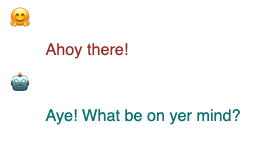
For a complete example, see the demo Colab where we fine-tune Llama 3.2 to speak like a pirate:
You can upload to the Hub
Once you are happy with your fine-tuned model, upload it directly from Keras using:
model.save_to_preset("./pirate-llama")
# Use your own repo here
keras_hub.upload_preset(
    uri = "hf://martin-gorner/llama-3.2-1B-pirate-instruct",
    preset = "./pirate-llama")
The uploaded model is visible here.
Distributed model parallelism for inference or training
Demo Colab for this section: Llama 3.1 Keras model parallel
Some of you are wondering, why use Keras when one can already work with LLMs on Hugging Face using Transformers? Answer: even if you don't care about Keras' flexibility and usability as a modeling framework (you should!), Keras is your quickest path to advanced model parallelism thanks to JAX and its powerful XLA compiler.
devices = keras.distribution.list_devices() # 8 TPU cores: let's do a 2x4 mesh
device_mesh = keras.distribution.DeviceMesh((2, 4), ["batch", "model"], devices)
layout_map = keras_hub.models.Llama3Backbone.get_layout_map(device_mesh) # defaults
distrib = keras.distribution.ModelParallel(layout_map=layout_map, batch_dim_name="batch")
keras.distribution.set_distribution(distrib)

# Now load the model, distributed across the accelerators
model = keras_hub.models.Llama3CausalLM.from_preset("hf://meta-llama/Llama-3.1-8B-Instruct")
And if you don't trust the default layout map provided by the model, you can define your own. In this example running on a "small" TPU setup with only 8 cores, the following layout map is a bit faster than the default (54s/epoch rather than 62s/epoch):
layout_map = keras.distribution.LayoutMap(device_mesh)

layout_map["token_embedding/embeddings"] = ("model", None)
layout_map["token_embedding/reverse_embeddings"] = ("model", None)
layout_map["self_attention.*(query|key|value).kernel"] = ("model", None, None)
layout_map["self_attention.*attention_output.kernel"] = ("model", None, None)
layout_map["feedforward_intermediate_dense.kernel"] = (None, "model")
layout_map["feedforward_gate_dense.kernel"] = (None, "model")
layout_map["feedforward_output_dense.kernel"] = ("model", None)
Check out the demo Colab here which fine-tunes the larger 8B Llama on pirate-speak, in just under 8 min on a Google TPU v5e (available in JupyterLab on Hugging Face Spaces. The fine-tuned model is here. And if you need a short model explainer about model parallelism and Keras, I have you covered here.